KTC 24 Inch vs Gawfolk 27 Inch Monitor: Which Should You Buy?
Both are 1080p 180Hz gaming monitors, so the real choice is a sharper flat IPS 24 inch or a bigger curved VA 27 inch.
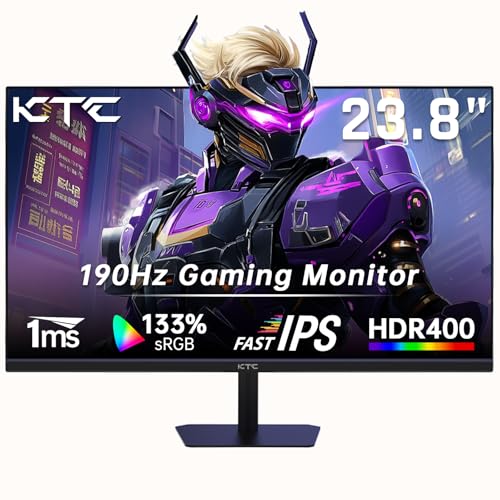 KTC
KTC 24 Inch Gaming Monitor, FHD 1080P@180Hz (OC
 Gawfolk
 27 Inch PC computer screen,1800R Curved Gaming
Side by side
| KTC 24 Inch Gaming Monitor, FHD | Gawfolk 27 Inch PC computer screen,1800R | |
|---|---|---|
| Price | See on Amazon → | See on Amazon → |
| Rating | ★★★★☆ 4.4 | ★★★★☆ 4.2 |
| Review count | 1,237 | 1,461 |
| Brand | KTC | Gawfolk |
| Highlights |
|
|
Our verdict
Pick the KTC if you sit close, want the sharper picture and quicker panel type, and have a normal-sized desk. Pick the Gawfolk if you want a bigger, curved screen and can live with softer text. Both stay at 1920x1080, so stretching that across 27 inches lowers pixel density. The KTC's pixel density works out around 92 ppi against roughly 82 ppi for the Gawfolk, and that gap is what you'll notice day to day.
Which one is for you?
- Desk gamers and everyday users who sit within arm's length and want a crisp, flat Fast IPS panel with DisplayPort 1.4 and two HDMI inputs. Read our full look at the KTC 24 Inch Gaming Monitor, FHD →
- Buyers who want a large curved screen for films and casual gaming, don't mind 1080p at 27 inches, and like built-in speakers. Read our full look at the Gawfolk 27 Inch PC computer screen,1800R →
Size and sharpness: the bit that matters most
Both monitors use a 1920x1080 panel. On a 24 inch screen that gives about 92 pixels per inch (our own arithmetic from size and resolution); on a 27 inch screen it drops to about 82. Text on the Gawfolk looks a little softer and you'll sit further back to hide the pixel grid. The KTC is the better fit for close-up work and competitive play.
If bigger is the point, 27 inches at 1080p is fine for video and games from a normal viewing distance. For spreadsheets and documents, it's the weaker choice.
Panel type and picture
The KTC listing describes a Fast IPS panel with 1ms response, HDR400 and Adaptive Sync. KTC's own page for its 24 inch 180Hz model lists HDR400 with 400 nits typical brightness and a 99% sRGB spec-table figure, even though the headline claims 133% sRGB (a gamut-volume style number). Treat the 99% figure as the practical one.
The Gawfolk uses a 1800R curved VA panel. A retailer listing (Pacifiko) gives 98% sRGB, 3000:1 contrast and 1ms GTG. VA panels typically give deeper blacks than IPS in a dark room, though the sources we opened don't measure it. IPS keeps colour more consistent from the side.
Refresh rate and inputs
The KTC has two HDMI 2.0 ports and one DisplayPort 1.4, with 180Hz and a 190Hz overclock, per its listing and KTC's page.
The Gawfolk's sources disagree on HDMI. The Pacifiko listing says DisplayPort up to 180Hz and HDMI up to 144Hz, while the product title and other bullets suggest 180Hz over HDMI. Plan on using DisplayPort for the full 180Hz and check the box before relying on HDMI. Both support FreeSync or Adaptive Sync.
Stand, mounting and extras
KTC's page lists tilt from -5 to 15 degrees and no height or swivel adjustment. The Gawfolk lists -5 to 10 degrees tilt and VESA 100x100mm. The Gawfolk title mentions a built-in speaker; the KTC listing doesn't, so budget for desk speakers or headphones (KTC has a headphone output).
The Gawfolk listing quotes a 12-month after-sales service, though one retailer listing also shows conflicting warranty text, so confirm with the seller.
Who should skip both
If you want 1440p or sharper text for work, neither is right: both are 1080p. Look at a QHD monitor instead. Competitive players wanting the quickest pixel response should also check independent measurements, because both response times here are manufacturer claims.
Questions people ask
Is a 24 inch or 27 inch monitor better for gaming?
For 1080p, 24 inch is the better match because the picture is sharper at the same resolution. 27 inch suits 1440p and above, or players who want a bigger, more immersive view.
Is 1080p okay on a 27 inch monitor?
It's usable, especially for games and video, but pixel density falls to roughly 82 ppi so text looks softer than on a 24 inch 1080p screen.
Does the Gawfolk 27 inch run at 180Hz over HDMI?
One retailer listing says HDMI tops out at 144Hz and DisplayPort reaches 180Hz, while other wording implies HDMI 180Hz. Use DisplayPort to be sure.
Does the KTC 24 inch have DisplayPort?
Yes, the listing and KTC's page both show one DisplayPort 1.4 and two HDMI 2.0 inputs.
Does the Gawfolk have built-in speakers?
The product title says it has built-in speakers. The Pacifiko listing we opened didn't list any, so check before relying on them.
Sources
- KTC, KTC 24 inch 190Hz 1080p gaming monitor page
- Pacifiko, Gawfolk 27 inch curved gaming monitor listing
Prices are pulled live from Amazon.
Prices move around, so always confirm on Amazon before deciding. Browse more options in Monitors or see the whole Computers & Accessories department. New to the category? Start with our buying guide.