Arduino Starter Kit vs Raspberry Pi 4: Which Should You Buy?
A complete microcontroller kit against a bare single-board computer: they solve different problems.
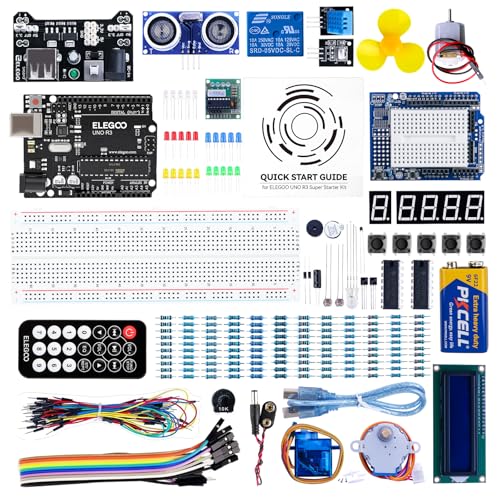 ELEGOO
 UNO R3 Project Super Starter Kit Compatible
 Raspberry Pi
 4 Model B (1GB)
Side by side
| ELEGOO UNO R3 Project Super Starter | Raspberry Pi 4 Model B (1GB) | |
|---|---|---|
| Price | See on Amazon → | See on Amazon → |
| Rating | ★★★★★ 4.6 | ★★★★★ 4.5 |
| Review count | 16,119 | 103 |
| Brand | ELEGOO | Raspberry Pi |
| Highlights |
|
|
Our verdict
Buy the Elegoo UNO R3 kit if you want to learn electronics: blinking LEDs, reading sensors, driving motors and a display, with parts in the box. Buy the Raspberry Pi 4 if you want a small Linux computer that runs Python, a media server or a web service. The Pi listing is the board alone, so budget for a power supply, storage card and a display and keyboard. The Arduino-compatible kit is the easier first step for pure beginners.
Which one is for you?
- Suits beginners who want to wire up circuits and write simple C-style sketches, with the parts and a lesson tutorial already included. Read our full look at the ELEGOO UNO R3 Project Super Starter →
- Suits people who want a real operating system, networking and USB ports, and who are happy to supply their own power, card and peripherals. Read our full look at the Raspberry Pi 4 Model B (1GB) →
Microcontroller board versus tiny computer
Arduino's documentation describes the UNO R3 around an ATmega328P running at 16 MHz, with 14 digital input/output pins (6 of them PWM) and 6 analog inputs. It runs one program, straight away, with no operating system. That makes it good at reading a sensor or switching a motor at an exact moment.
The Raspberry Pi 4 is a different animal. Raspberry Pi lists a quad-core Cortex-A72 64-bit processor at 1.8GHz on its current product page (the listing here quotes 1.5GHz, so check which board revision you get), LPDDR4-3200 memory in 1GB to 8GB versions, dual-band Wi-Fi, Bluetooth 5.0, Gigabit Ethernet, two USB 3.0 and two USB 2.0 ports and two micro-HDMI outputs. It is a computer first. The listing here is the 1GB Raspberry Pi 4 Model B, which is enough for light projects but tight for a full desktop.
What comes in the box
The ELEGOO UNO R3 Super Starter Kit is a bundle. Its listing mentions a tutorial of more than 24 lessons, an LCD1602 module with a pin header so you can start without soldering, a power supply module and a 9V battery with DC connector. The listing recommends adult supervision for younger users. Elegoo's own store page for the kit shows a 1 year warranty and lifetime email support, though that page showed the item as sold out when we looked, so check availability.
The Pi listing is just the board. Raspberry Pi's page says it runs from 5V DC at a minimum of 3A over USB-C and recommends a 15W USB-C supply, and you'll need a storage card, micro-HDMI cable and keyboard on top. Look for those in the listing before you order.
Which is easier to learn
For electronics fundamentals the kit wins: nothing to install on the board beyond the Arduino IDE, no boot-up time, and a mistake can't corrupt an operating system. The Pi is better once you want networking, cameras, a web dashboard or Python libraries. Many people end up with both, using an Arduino-style board for the sensor side and a Pi for the brains.
If you're weighing the Pi against its newer sibling, read our Raspberry Pi 4 vs Pi 5 comparison. More boards sit in barebone PCs.
Who should skip both
If you just want a cheap general-purpose computer, neither is the right tool. A mini PC will be a smoother desktop than a 1GB Pi.
Questions people ask
Arduino or Raspberry Pi: which should a beginner buy?
For learning circuits, start with the Arduino-compatible kit, because the parts and a tutorial come with it. Pick the Pi if you specifically want a Linux computer or to run Python programs.
Can a Raspberry Pi 4 do what an Arduino does?
Partly. The Pi has a 40-pin GPIO header and can switch pins, but it runs a full operating system, so it isn't ideal for tight timing. The Arduino runs a single program with no operating system.
Does the Raspberry Pi 4 come with a power supply?
The listing here is for the board only. Raspberry Pi says the board needs 5V at a minimum of 3A over USB-C and recommends a 15W supply, so check the listing for what's included.
Do I need to solder anything in the Elegoo kit?
Not for the LCD1602 module, according to the listing, which says its pin header lets you set it up without soldering.
Is the Raspberry Pi 4 still being made?
Yes. Raspberry Pi says the Pi 4 Model B will stay in production until at least January 2034.
Sources
- Arduino, Arduino UNO R3 documentation
- Raspberry Pi, Raspberry Pi 4 Model B product page
- Elegoo, UNO R3 Super Starter Kit store page
Prices are pulled live from Amazon.
Prices move around, so always confirm on Amazon before deciding. Browse more options in Barebone PCs or see the whole Computers & Accessories department. New to the category? Start with our buying guide.